KDP cover calculator and template generator
Enter your trim size, page count and paper. Get the exact cover size and a template to design on. Numbers checked against KDP’s calculator on 8 Nov 2026.
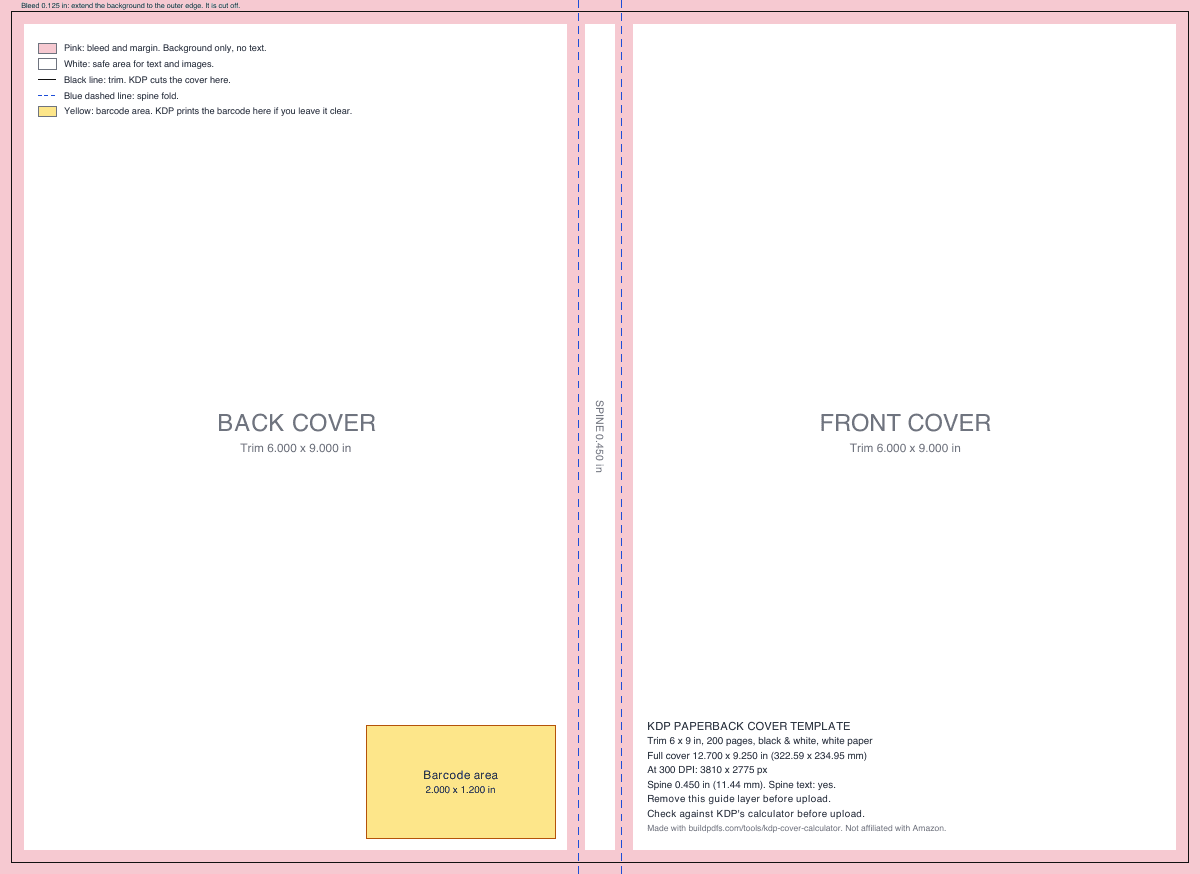
| Trim (each cover) | 6.000 × 9.000 in |
|---|---|
| Bleed (all outside edges) | 0.125 in |
| Safe margin | 0.125 in from trim and folds |
| Spine text margin | 0.0625 in from each fold |
| Barcode area | 2.000 × 1.200 in, 0.250 in from spine, 0.250 in from bottom |
| Spine text allowed | Yes (80 pages or more) |
| Full cover at 300 DPI (Canva, Photoshop) | 3810 × 2775 px |
We matched 26 outputs of KDP’s own cover calculator, paperback and hardcover. Checked on 8 Nov 2026 against KDP Help: Create a paperback cover, Create a hardcover cover, Print options (trims and page limits), Barcodes.
How your full-wrap cover size is calculated
A KDP paperback cover is one PDF page with the back cover, the spine and the front cover side by side. Add a 0.125 in (3.2 mm) bleed on every outside edge:
width = bleed + trim width + spine + trim width + bleed
height = bleed + trim height + bleed
spine = page count × paper thickness per page
Example: a 6 × 9 in paperback, 200 pages, white paper. The spine is 200 × 0.002252 = 0.4504 in. The width is 0.125 + 6 + 0.4504 + 6 + 0.125 = 12.700 in. The height is 0.125 + 9 + 0.125 = 9.250 in. In millimetres that is 322.59 × 234.95 mm, and at 300 DPI it is 3,810 × 2,775 px.
Spine width by paper type
The spine width is the only part of the cover size that changes with the book. It depends on the page count and the paper. These are the per-page values KDP’s calculator uses:
| Interior and paper | Per page | 100 pages | 200 pages | 300 pages |
|---|---|---|---|---|
| Black & white, white paper | 0.002252 in | 0.225 in | 0.450 in | 0.676 in |
| Black & white, cream paper | 0.0025 in | 0.250 in | 0.500 in | 0.750 in |
| Black & white, groundwood paper | 0.00235 in | 0.235 in | 0.470 in | 0.705 in |
| Standard color, white paper | 0.002252 in | 0.225 in | 0.450 in | 0.676 in |
| Premium color, white paper | 0.002347 in | 0.235 in | 0.469 in | 0.704 in |
KDP Help lists 0.0596 mm per page for both groundwood and premium color, but the inch values differ (0.00235 and 0.002347 in), and KDP’s calculator uses the inch values. Standard color uses 72 pages or more.
Spine text needs 80 pages or more. KDP allows text on a paperback spine only when the book has more than 79 pages. Keep any spine text 0.0625 in (1.6 mm) from each fold, because the fold can move by that much.
KDP hardcover cover size
A KDP hardcover is a case laminate: the printed cover is glued to two boards and folds around their edges. So the cover has a wrap instead of a bleed, and the boards are larger than the trim.
| Part | Size |
|---|---|
| Wrap, on every outside edge | 0.591 in (15 mm) |
| Board | trim + 0.197 in (5 mm) wide, + 0.236 in (6 mm) tall |
| Hinge, each side of the spine | 0.394 in (10 mm), no text |
| Spine | pages × paper value + 0.189 in (4.8 mm) |
| Safe margin | 0.125 in inside the board edge |
KDP hardcovers come in five trims: 5.5 × 8.5, 6 × 9, 6.14 × 9.21, 7 × 10, 8.25 × 11 in. They take 75 to 550 pages on white, cream or premium color paper. There is no groundwood or standard color hardcover.
Why is a hardcover spine wider? The spine wraps the book block and the two boards. KDP adds 4.8 mm (0.189 in) to the page thickness for that. A 200-page white hardcover has a 0.639 in spine; the same paperback has a 0.450 in spine.
KDP’s hardcover help page gives the wrap as “0.51 in (15 mm)”. 15 mm is 0.591 in, and KDP’s calculator and its own templates use 0.591 in. This tool uses the calculator values.
Barcode area and safe zones
The barcode area is 2.000 × 1.200 in (50.8 × 30.5 mm). It sits on the back cover, 0.25 in from the spine fold and 0.25 in above the bottom trim. In the 6 × 9 example it runs from 3.750 to 5.750 in across the back cover.
Leave it clear and KDP prints the barcode for you. Books that read right to left have the barcode at the lower left of the back cover. On a hardcover it is 0.25 in from the hinge and 0.375 in above the board edge.
Keep text and faces 0.125 in (3.2 mm) inside the trim and the spine folds. Keep spine text 0.0625 in from each fold. Backgrounds and images should run to the outer edge of the bleed.
KDP trim sizes
| Inches | Millimetres |
|---|---|
| 5 × 8 | 127.00 × 203.20 |
| 5.06 × 7.81 | 128.52 × 198.37 |
| 5.25 × 8 | 133.35 × 203.20 |
| 5.5 × 8.5 | 139.70 × 215.90 |
| 6 × 9 | 152.40 × 228.60 |
| 6.14 × 9.21 | 155.96 × 233.93 |
| 6.69 × 9.61 | 169.93 × 244.09 |
| 7 × 10 | 177.80 × 254.00 |
| 7.44 × 9.69 | 188.98 × 246.13 |
| 7.5 × 9.25 | 190.50 × 234.95 |
| 8 × 10 | 203.20 × 254.00 |
| 8.25 × 6 | 209.55 × 152.40 |
| 8.25 × 8.25 | 209.55 × 209.55 |
| 8.5 × 8.5 | 215.90 × 215.90 |
| 8.5 × 11 | 215.90 × 279.40 |
| 8.27 × 11.69 | 210.06 × 296.93 |
| Inches | Millimetres |
|---|---|
| 5.5 × 8.5 | 139.70 × 215.90 |
| 6 × 9 | 152.40 × 228.60 |
| 6.14 × 9.21 | 155.96 × 233.93 |
| 7 × 10 | 177.80 × 254.00 |
| 8.25 × 11 | 209.55 × 279.40 |
| Paper | Paperback | Hardcover |
|---|---|---|
| Black & white, white paper | 24–828 | 75–550 |
| Black & white, cream paper | 24–776 | 75–550 |
| Black & white, groundwood paper | 24–812 | – |
| Standard color, white paper | 72–600 | – |
| Premium color, white paper | 24–828 | 75–550 |
A custom paperback trim can be 4 to 8.5 in wide and 6 to 11.69 in tall. The page limits are per paper. Some large trims allow fewer pages, so check the maximum for your trim in KDP.
Use the template in Canva, Photoshop or Affinity
- 1
Make a document at the full cover size
Use the pixel size from the results (for example 3,810 × 2,775 px for 6 × 9 in, 200 pages). In Canva, choose Custom size. In Photoshop or Affinity, use inches and 300 DPI.
- 2
Place the PNG as the top layer and lock it
The guides then sit over your design. Set the layer to Multiply or lower its opacity so you can see your work under it.
- 3
Design under the guides
Run backgrounds to the outer edge. Keep text in the white areas. Leave the yellow barcode area clear unless you add your own barcode.
- 4
Hide the template and export one PDF
Hide or delete the guide layer, then export the whole cover as one PDF at 300 DPI with fonts embedded. Upload it in KDP and check it in the Print Previewer.
KDP asks for one PDF with the back, spine and front, at least 300 DPI, with fonts embedded and layers flattened. The file can be up to 650 MB; 40 MB or less is best.
Questions about KDP cover size
How do I calculate the spine width of my book?
Multiply the page count by the thickness of one page for your paper. For KDP white paper that is 0.002252 in, so a 200-page book has a 0.4504 in spine. Cream is 0.0025 in per page, groundwood 0.00235 in, premium color 0.002347 in and standard color 0.002252 in. A hardcover adds 4.8 mm (0.189 in) for the boards.
Can I put text on the spine?
On a KDP paperback, only when the book has 80 pages or more. Keep spine text 0.0625 in (1.6 mm) from each fold, because the fold can move by that much in printing.
Why did KDP reject my cover for its size?
The most common cause is a page count that changed after the cover was made. The spine width depends on the page count, so the full cover width changes too. Use the final page count of your interior PDF, run the calculator again and fix the cover to the new width. Also check that the PDF has the bleed on all outside edges.
What size is a KDP hardcover cover?
For a 6 × 9 in hardcover with 200 pages on white paper, the full cover is 14.214 × 10.417 in. That is two boards of 6.197 × 9.236 in, a 0.639 in spine and a 0.591 in (15 mm) wrap on every outside edge.
Does KDP add the barcode for me?
Yes. If you leave the barcode area on the back cover clear, KDP prints the barcode there. If you add your own, it must be at least 1.4 × 0.8 in. The suggested size is 2 × 1.2 in.
What size is a Kindle ebook cover?
2,560 × 1,600 px is ideal: a height-to-width ratio of 1.6:1, as a JPEG or TIFF under 50 MB. An ebook cover is the front only, so it has no spine and needs no template.
Will this template work for IngramSpark or Lulu?
No. Other printers use different paper thickness and different rules. Printing elsewhere? Use that printer's own template.
Now format the interior
Your spine width comes from the page count, and the page count comes from the interior. So finish the interior first, then make the cover. BuildPDFs formats your manuscript into a print-ready book interior at 6 × 9, 5.5 × 8.5 or any trim: mirrored margins wide enough for KDP’s gutter rules, chapters that start on a right-hand page, running heads, page numbers that skip the front matter, a table of contents with real page numbers and embedded fonts. Upload a .docx, .md, .txt, .pdf or .epub, or start from an outline.
This tool makes a template with guides, not a finished cover. Sizes checked against KDP’s cover calculator and KDP Help on 8 Nov 2026; check your final file in KDP’s Print Previewer. Not affiliated with Amazon. KDP is a trademark of Amazon.com, Inc.