How to Self-Publish a Book (Step by Step, With Real Files)
Self-publish a paperback on Amazon KDP in 8 steps. See the real interior file, KDP's own print costs and royalties, the margin rules, and a pre-upload checklist.
How do you self-publish a book? Write and edit the manuscript, format it as a print-ready interior PDF, make a cover PDF, get an ISBN, set up the book on Amazon KDP, upload both files, check the proof, and launch. KDP charges nothing up front. You pay the print cost of each copy out of the sale price. The steps below show the real files at each stage and the real numbers from KDP Help (checked November 8, 2026).
The 8 steps: Write → Edit → Format the interior → Cover → ISBN → KDP setup → Upload and proof → Launch.
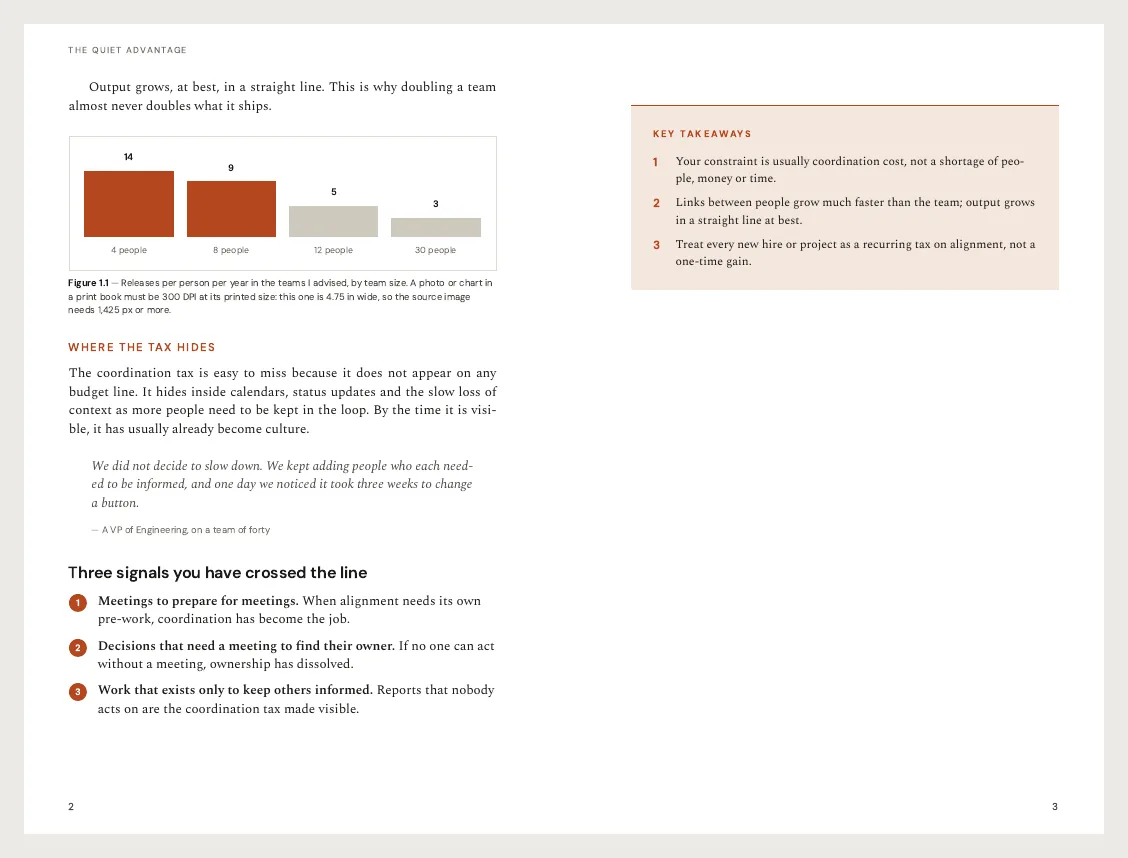
A spread from our 6×9 sample interior. Download the full sample PDF (16 pages, no sign-up) and open it next to this guide.
The two files KDP needs
A KDP paperback is two PDFs:
- The interior file. Every page of the book, at the trim size, as single pages (not spreads). This is the file most first-time authors get wrong.
- The cover file. One wide PDF: back cover, spine and front cover, with bleed on all sides. Its width depends on your page count and paper.
You can also upload a Word file (.doc or .docx) for the interior. KDP converts it to PDF for you, but only if nothing on the page bleeds to the edge (KDP Help). A PDF that you made and checked yourself is the safer choice, because what you see is what prints.
Steps 1 and 2: write and edit
Finish the draft before you think about layout. Then edit in passes: structure first, then line edits, then a proofread. Read the book aloud once; it catches the errors your eyes skip.
If you hire help, editing is the biggest cost. Reedsy's 2026 survey of its marketplace puts copy editing an 80,000-word book at about $2,160 on average (Reedsy, updated Aug 13, 2026). Many authors swap manuscripts with a critique partner for the structural pass and pay only for a proofread.
Write in whatever tool you like: Word, Google Docs, Scrivener. Use real headings (Heading 1 for chapter titles) so the chapters can be found later.
Step 3: format the interior
This is the step that turns a manuscript into a book. A print interior needs:
- A trim size. 6×9 in is the most common size for nonfiction. 5×8 and 5.5×8.5 in are common for fiction. Poetry often uses 5.5×8.5 in.
- Mirrored margins, with a wider inside margin (the gutter) so text does not disappear into the spine.
- Front matter: title page, copyright page, contents. Roman page numbers (i, ii, iii) here are fine.
- Chapters that start on a right-hand page, with page 1 on the first page of chapter one. Even page numbers on the left, odd on the right.
- Running heads and page numbers on body pages, none on chapter openers.
- Embedded fonts and nothing smaller than 7 pt.
KDP's margin rules
The inside margin depends on the page count (KDP Help: trim size, bleed and margins):
| Page count | Inside margin (gutter) | Outside, top, bottom (no bleed) |
|---|---|---|
| 24 to 150 | 0.375 in | at least 0.25 in |
| 151 to 300 | 0.5 in | at least 0.25 in |
| 301 to 500 | 0.625 in | at least 0.25 in |
| 501 to 700 | 0.75 in | at least 0.25 in |
| 701 to 828 | 0.875 in | at least 0.25 in |
The minimum is not the target. A 0.75 in gutter works for any book up to 700 pages and reads more comfortably than 0.375 in. Our KDP 6×9 interior template uses 0.75 in inside and 0.5 in outside for that reason.
Pick a starting layout
- Nonfiction for KDP: the KDP 6×9 interior template has roman front matter, chapter openers, tables, callouts and a pre-upload checklist page.
- First book, any genre: the book template labels every part of a book (half title, copyright, contents, chapter opener, scene break) so you can see what goes where. Download its sample PDF.
- Fiction: the novel interior layout is a 5.5×8.5 in literary design.
- Poetry: the poetry book layout keeps stanzas together and starts each poem on a new page. Download its sample PDF.
- Cookbooks: see self-publishing a cookbook for trim sizes and color print costs.
Format it
You can set all of the above by hand in Word or InDesign. Or format your book interior for KDP with the AI book formatter: upload your .docx, .md or .txt manuscript, pick a trim size, and it lays out the front matter, mirrored margins, right-hand chapter starts, running heads, page numbers and a contents page with real page numbers. Export the PDF and check every page. For a long novel, format it a few chapters at a time.
Step 4: the cover
The cover is one PDF: back, spine and front. The spine width comes from your page count and paper type, so finish the interior first. Then you know the final page count.
KDP's cover file needs bleed on every side (0.125 in), and the spine text must stay clear of the spine edges. KDP's Cover Creator can build a simple cover in the browser. For anything more, a designer is worth the money: Reedsy's 2026 median for a cover is $930.
Step 5: the ISBN
A paperback needs an ISBN. You have two choices (KDP Help: ISBNs):
- A free KDP ISBN. KDP assigns it at setup. The imprint on your Amazon page shows as "Independently published", and you can use that ISBN only on KDP.
- Your own ISBN. Buy it from your country's ISBN agency (Bowker at myidentifiers.com in the US; check the current price there). You choose the imprint name, and you can use the same ISBN with other printers.
Put the ISBN on the copyright page. Kindle eBooks do not need an ISBN.
Step 6: price and royalty
KDP's paperback royalty on Amazon.com is 60% of the list price if you price at $9.99 or more, and 50% below $9.99. The printing cost comes out of that (KDP Help: paperback royalty).
Printing cost = fixed cost + (pages × cost per page). For US black ink: $2.30 flat for 24 to 110 pages at a regular trim, or $1.00 + $0.012 a page above 110 pages. Large trims (wider than 6.12 in or taller than 9 in) cost more per page (KDP Help: printing cost).
Here are three real books worked out with those formulas:
| Book | Trim | Pages | Ink | Print cost | List price | Royalty per copy |
|---|---|---|---|---|---|---|
| Novel | 5.5×8.5 in | 120 | Black | $2.44 | $12.99 | $5.35 |
| Nonfiction | 6×9 in | 250 | Black | $4.00 | $16.99 | $6.19 |
| Cookbook | 8×10 in | 120 | Premium color | $10.60 | $24.99 | $4.39 |
The $9.99 line matters. A 200-page 6×9 paperback costs $3.40 to print. At $14.99 it earns $5.59 a copy. At $9.98 it earns $1.59, because the rate drops to 50%. Price at $9.99 or more if the book can carry it.
Step 7: upload, preview and proof
In KDP, create a paperback, fill in the details (title, description, keywords, categories), then upload the interior and cover PDFs. Choose No bleed for a text interior. Open the Print Previewer and look at every page it flags. Then order a proof copy and read it on paper.
Pre-upload checklist
Built from the reasons KDP gives for rejecting files (KDP Help: paperback manuscript):
- The PDF page size equals the trim size (6×9 in for a 6×9 book, no bleed).
- At least 24 pages, blank pages included.
- Single pages, not two-page spreads.
- Even page numbers on the left, odd on the right.
- The inside margin matches the table above for your page count.
- All fonts embedded; no text smaller than 7 pt.
- Images 300 DPI at their printed size.
- No crop marks, comments or bookmarks.
- File under 650 MB.
- Print Previewer checked, page by page.
Our 6×9 sample PDF ends with this checklist as a removable page.
Step 8: launch
Write the book description like a back cover, not a summary. Pick categories that match the shelf your book belongs on, and fill the seven keyword boxes with phrases a reader would type. Ask your first readers for honest reviews, and put a short "note to readers" page at the end of the book that asks for one. Then start the next book: a second title is the best marketing for the first.
The real cost of self-publishing
| Item | Do it yourself | Hire it out (Reedsy 2026 averages) |
|---|---|---|
| Editing | Critique partners, read-aloud passes | Copy edit about $2,160 for 80,000 words |
| Cover | KDP Cover Creator: $0 | Median $930 |
| Interior formatting | Template or formatter | About $800 |
| ISBN | Free KDP ISBN: $0 | Your own ISBN from Bowker |
| Printing | $0 up front; print cost comes out of each sale | Same |
| Proof copy | Print cost plus shipping | Same |
Reedsy puts the total for a fully hired-out book at $2,940 to $5,660 (Reedsy, updated Aug 13, 2026). The do-it-yourself path can cost little more than a proof copy. Most authors land in between: they pay for an edit and a cover, and format the interior themselves.
Ready for step 3? Format your book interior for KDP, or start from the KDP 6×9 interior template.
Put this guide to work
 Self-Publish a Cookbook: 8×10 Print-Ready Template
Free, edit with AI
 Minimal eBook template
Free, edit with AI
 Self-Published Book template
Free, edit with AI
Or describe your document and the AI eBook writer writes and designs it. You can also try the AI book writer.
See all Book and Cookbook Templates.